How to Connect Opmiz to ChatGPT: Opmiz MCP Setup Guide
Add Opmiz to ChatGPT as a custom MCP plugin, on any plan including free, choose what ChatGPT may do, and manage your website and store by chat.
S
Srijan
Founder, Opmiz
ChatGPT is good at writing product descriptions and planning offers. Connect it to Opmiz, and it can also put that work on your website and store for you.
Opmiz has an MCP server. MCP (Model Context Protocol) is an open standard that lets an AI app use tools in another service, and ChatGPT can add any MCP server as a plugin. Once Opmiz is connected, you can ask ChatGPT to add a page, write a blog post, update a product or change your site's design, and it does it in your Opmiz account.
Setting it up takes about five minutes. There is nothing to install and no API key to copy: you add one address in ChatGPT and sign in to Opmiz.
In this guide
What You Need
- A ChatGPT account. The free plan works: the screenshots in this guide were taken on one. On a ChatGPT Business or Enterprise workspace, your admin decides whether you can add your own plugins.
- ChatGPT on the web, at chatgpt.com, for the setup.
- An Opmiz account. If you don't have one yet, start your free trial: 14 days free, no credit card required.
- The Opmiz connector address:
https://mcp.opmiz.com/mcp. You'll also find it with a Copy button in Opmiz under Settings, then AI apps.
Open Plugins
- In ChatGPT, choose Plugins in the left sidebar. (It opens chatgpt.com/plugins.)
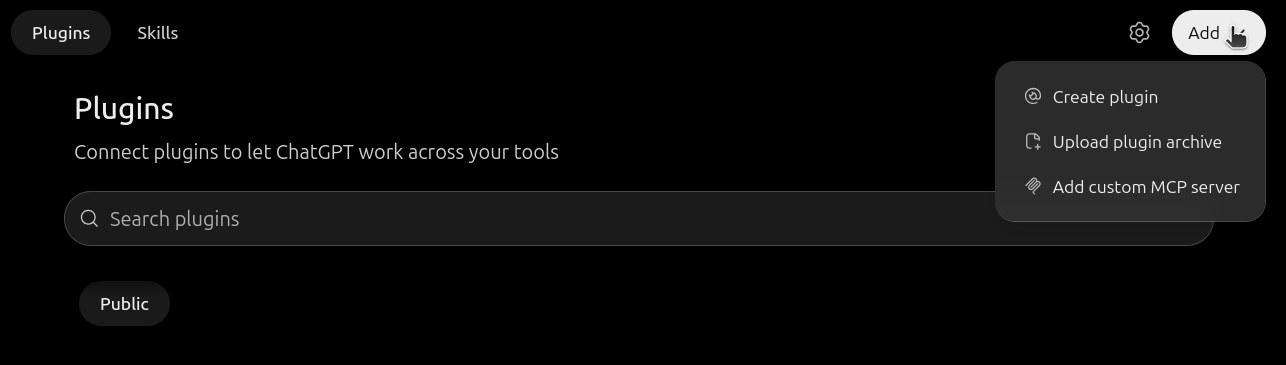
- Press Add at the top right, then Add custom MCP server.
Add Opmiz as a Custom MCP Server
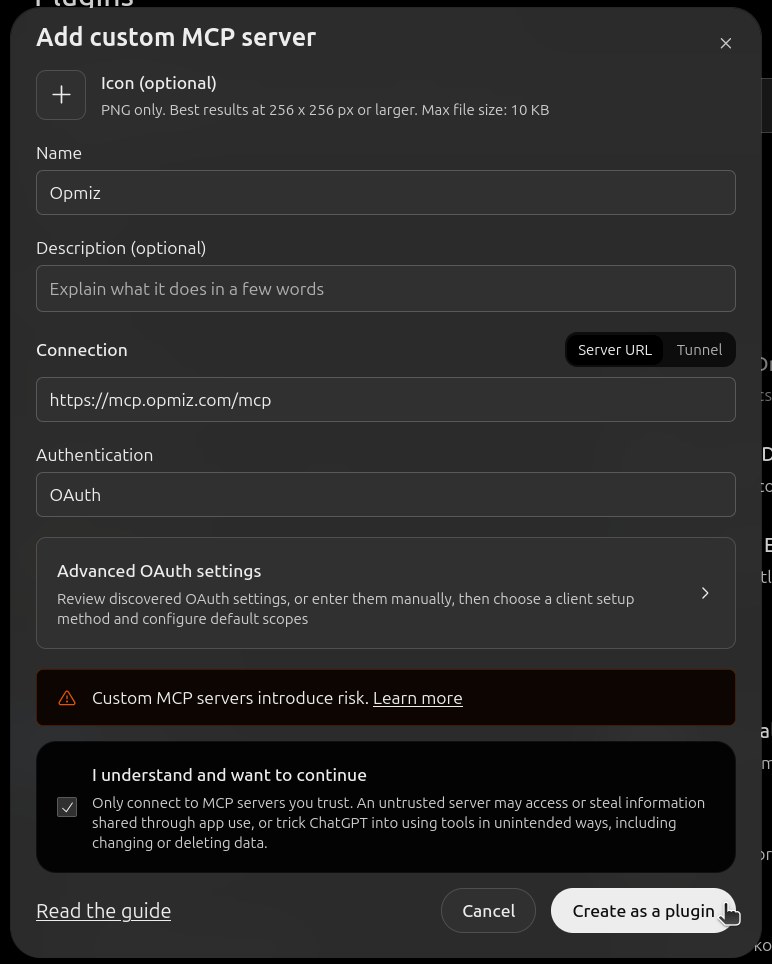
- For Name, type Opmiz. The icon and description are optional.
- Under Connection, keep Server URL selected and paste
https://mcp.opmiz.com/mcp. - Leave Authentication on OAuth. ChatGPT finds Opmiz's sign-in settings by itself, so you don't need to open Advanced OAuth settings.
- ChatGPT shows a warning that custom MCP servers introduce risk. It shows this for every server you add yourself. Tick I understand and want to continue.
- Press Create as a plugin.
Connect and Choose What ChatGPT May Do
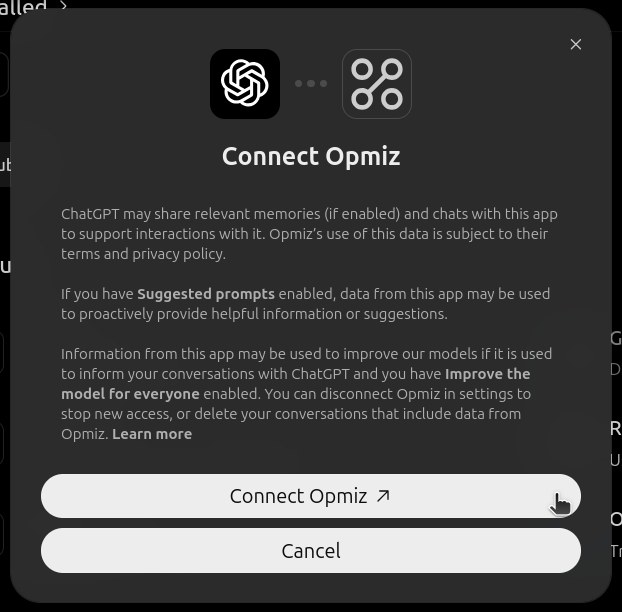
ChatGPT asks you to connect Opmiz and explains what it shares with the plugin. Press Connect Opmiz.
A new browser tab opens on Opmiz. Your password goes to Opmiz only; the AI app never sees it.
- Sign in to Opmiz, if you aren't already.
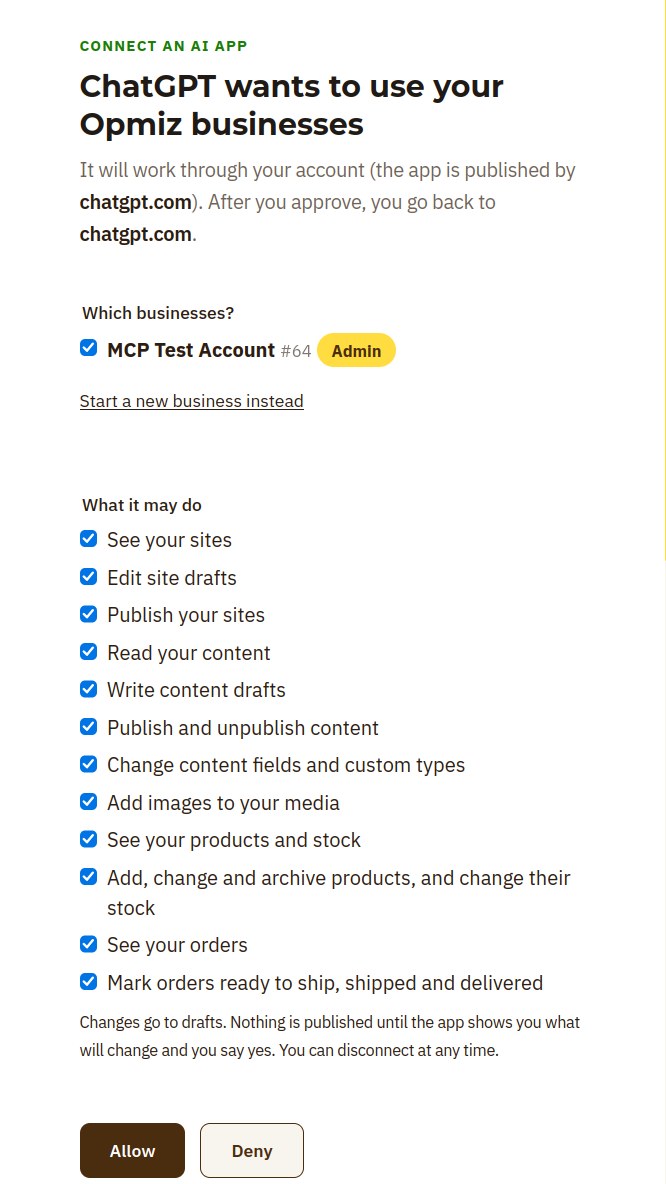
- Under Which businesses?, choose the businesses it may work on. If you have only one, it's ticked for you.
- Under What it may do, every permission starts ticked. Untick anything you don't want, such as publishing or orders.
- Press Allow. The tab sends you back to your AI app.
The app can never do more than you can do yourself in the Opmiz dashboard, and tools for anything you unticked simply don't appear.
Use Opmiz in a Chat
Start a new chat and ask for something, naming Opmiz. You can also type @ in the message box and choose Opmiz.
Start with something that only reads, to check the connection:
ChatGPT replies with your businesses and your role in each. You're connected.
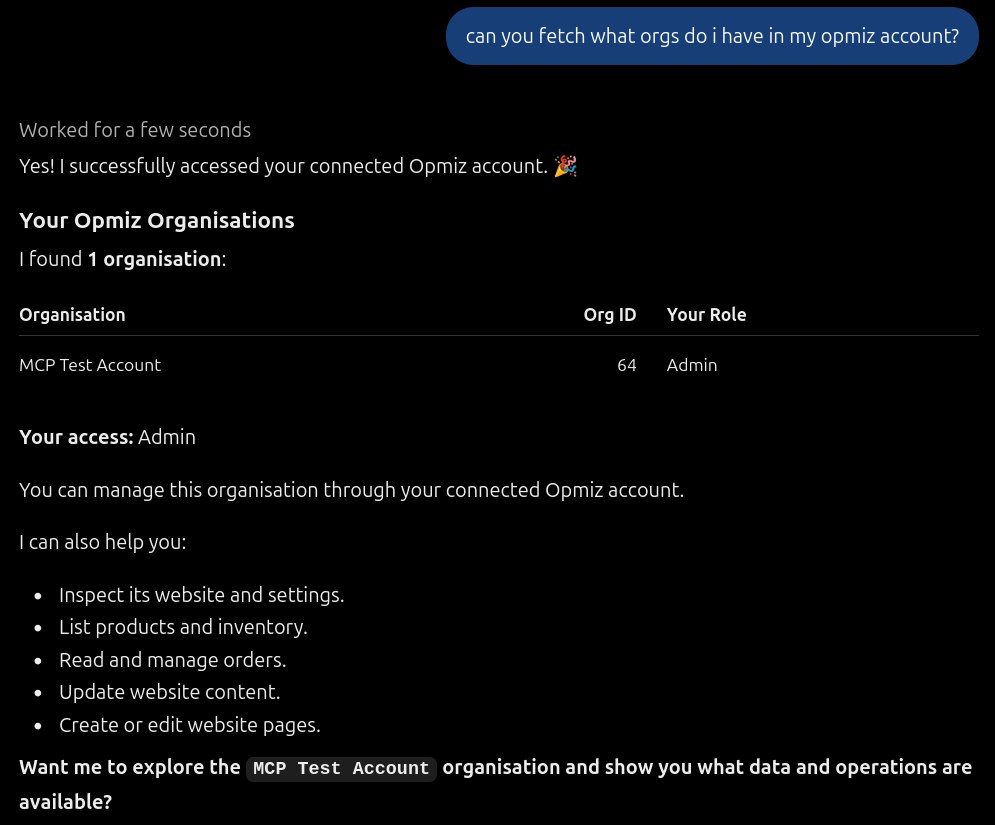
Temporary chats don't use plugins, so use a normal chat.
Choose When ChatGPT Asks You
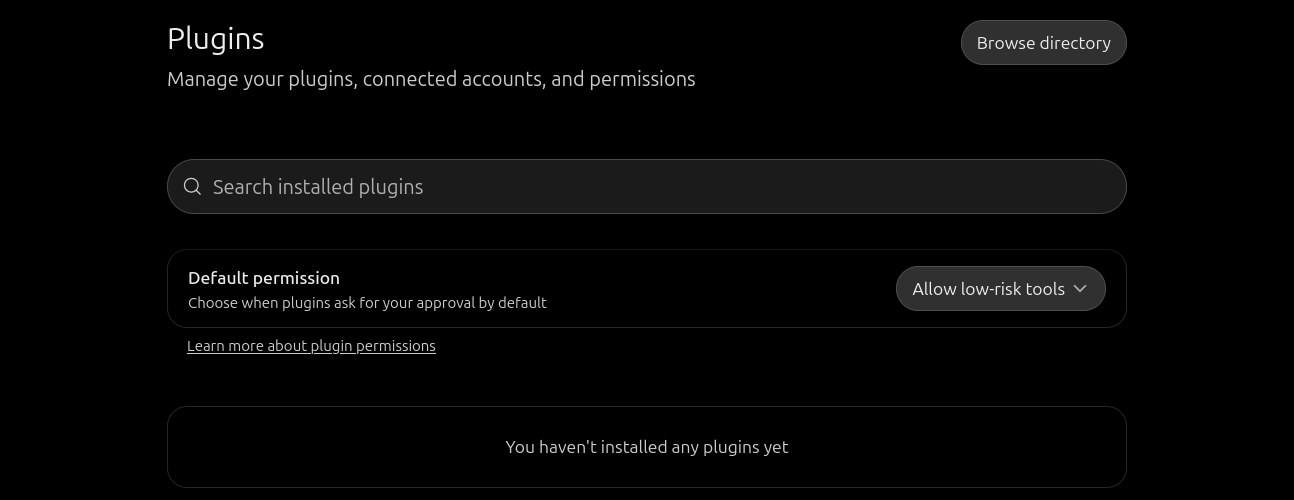
In ChatGPT, open Settings, then Plugins. Default permission decides when plugins ask for your approval. It starts on Allow low-risk tools, so ChatGPT asks you before it uses a tool that can change things.
Read what it is about to do, then approve. Publishing your site is a separate step anyway: Opmiz shows what will go live and waits for your yes.
Don't have an Opmiz store yet?14 days free · no credit card required
Start free for 14 daysWhat to Ask ChatGPT
Brief it the way you'd brief a helpful assistant, and mention Opmiz so ChatGPT uses it:
What Works Better Elsewhere
Everyday edits work the same in any AI app. A few jobs need an app that can send files from your computer:
- Adding many products from a spreadsheet, or a folder of photos. Do these in the Opmiz dashboard (Products, then Bulk upload), or with Claude Code, which can send the files straight to Opmiz.
- Photos for a single product or post. ChatGPT can add a photo that is already online, from its web address. For a photo on your phone, upload it in the Opmiz dashboard.
Prefer Claude? Read our guide on connecting Opmiz to Claude.
How Your Site Stays Safe
Connecting an AI app doesn't hand over your live website.
- Design changes go to your draft. Your customers see nothing until the site is published, and publishing waits for your yes.
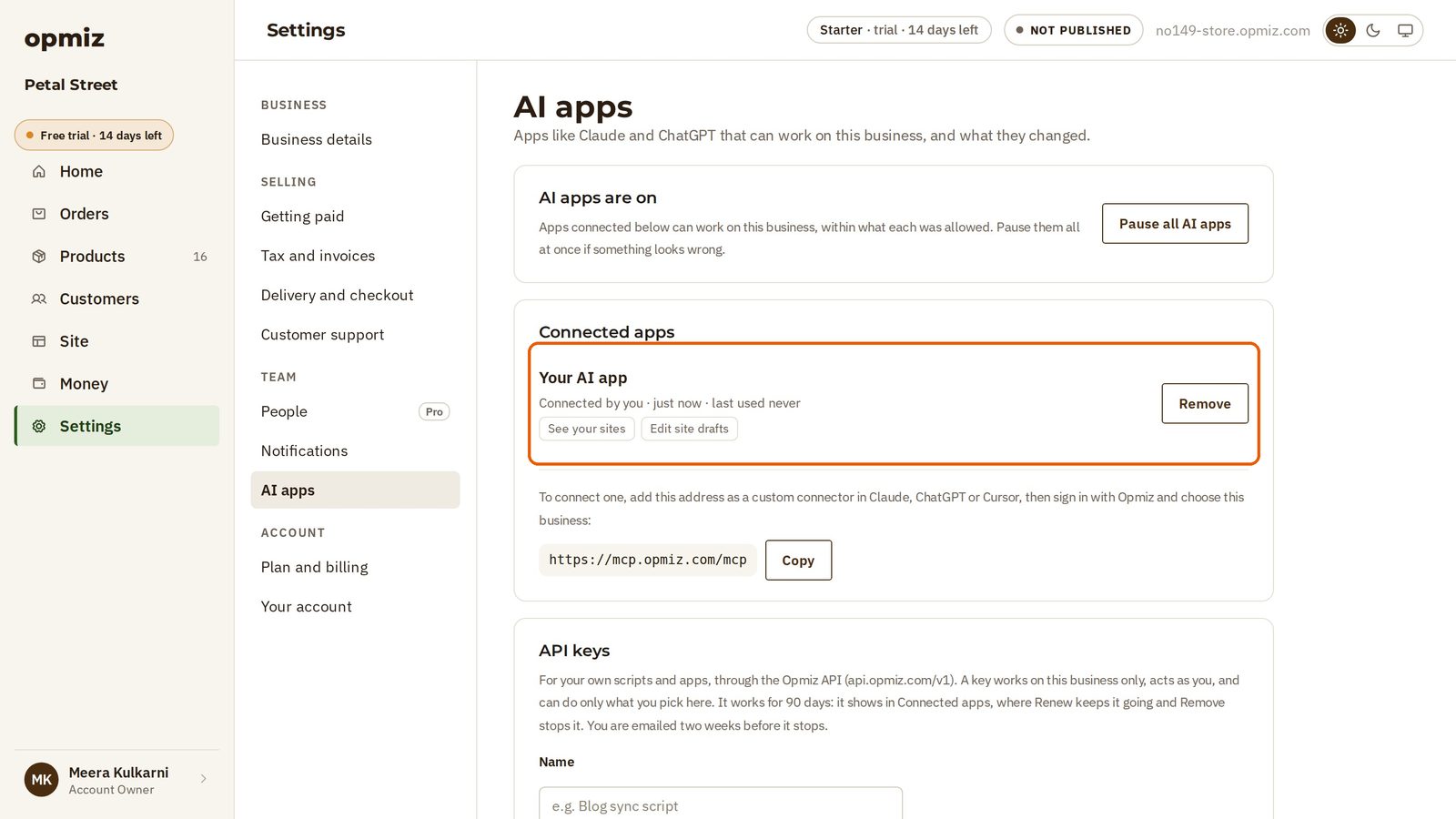
- Every change is recorded. Open Settings, then AI apps in Opmiz to see which app changed what, and undo it.
- You can cut it off at any time. Remove the app from AI apps and its access ends at once.
- Some things change the live shop straight away, like product prices, stock, page settings and business details, so the assistant shows you a preview and asks before saving those.
If Something Doesn't Work
- You don't see Add custom MCP server. On a ChatGPT Business or Enterprise workspace, your admin may have turned off custom plugins. Ask them to allow it.
- ChatGPT doesn't use Opmiz. Start your request with
@Opmiz, and check you're not in a temporary chat. - Some tools are missing, like products or orders. The permission may have been unticked when you connected. Remove the app in Settings, then AI apps in Opmiz, then connect again from ChatGPT.
- ChatGPT says your plan doesn't include something. Some features, like delivery fees or bulk uploads, need a particular Opmiz plan. Compare them on the pricing page.
- A change "conflicts" with another one. Someone, or another app, edited the site at the same time. Ask ChatGPT to read the site again and retry.
The technical setup guide is at docs.opmiz.com. Stuck? Write to support@opmiz.com.
Frequently Asked Questions
Can I connect Opmiz to the free version of ChatGPT?
Yes. Plugins, including your own MCP servers, are available on the free plan; this guide was made on one.
Do I need to know coding?
No. You paste one address into ChatGPT and sign in to Opmiz. After that you just chat.
Can ChatGPT publish changes without asking me?
Design changes wait in your draft, and publishing your site needs your yes. If you'd rather keep all publishing to yourself, untick the publish permission when you connect.
Does ChatGPT see my Opmiz password?
No. You sign in on Opmiz's own page, and ChatGPT only gets the permissions you approved. You can remove its access in Opmiz under Settings, then AI apps.
Can I connect more than one business?
Yes. On the Opmiz sign-in page, tick every business ChatGPT may work on, and say which one you mean in your request.
Steps and screenshots as of November 2026. ChatGPT's menus changed several times this year; if a label looks different, look for the option to add a custom MCP server.
Srijan is the founder of Opmiz. More about Opmiz
AI websites with native commerce. Pages, blog, store, payments and GST invoices in one place, built from a short description.
Start free for 14 days →© 2026 Opmiz · WriterBabu Online Services Private Limited. All rights reserved.
Prices in INR, before 18% GST · Made in Patna, India