Wix Alternative for India: Opmiz vs Wix for Small Businesses (2026)
Wix or Opmiz for an Indian small business? Prices in rupees, UPI and cash on delivery, GST invoices, your own domain, and what each one does better.
S
Srijan
Founder, Opmiz
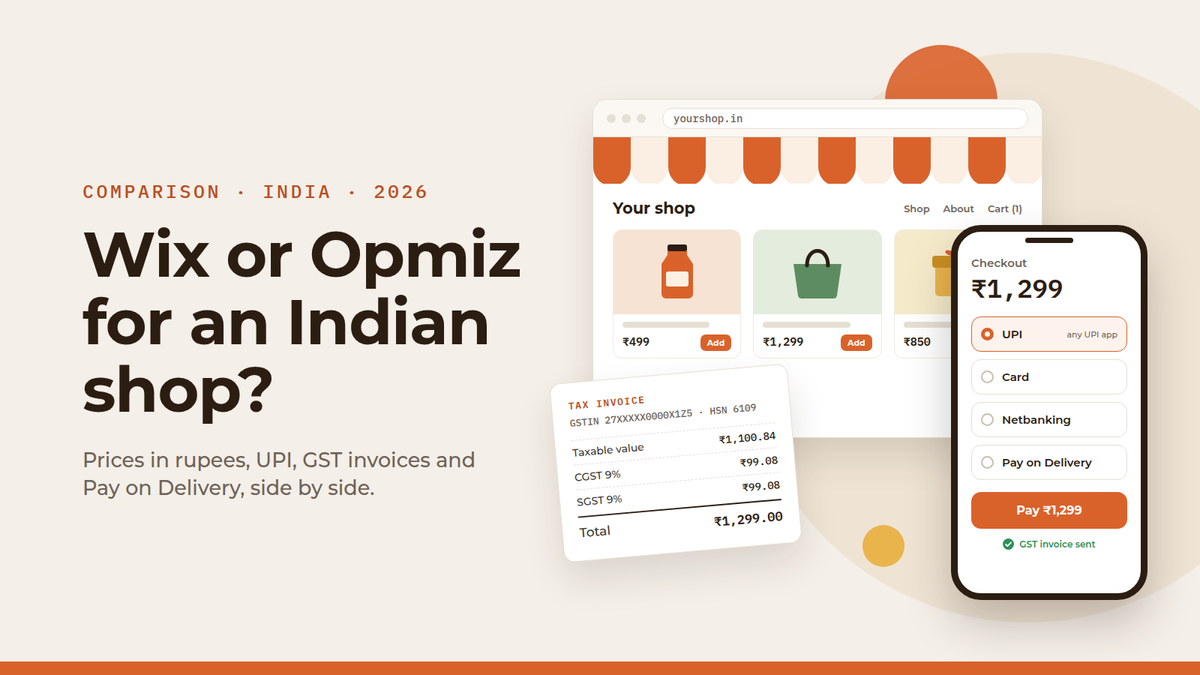
If you run a small business in India and you're looking for a Wix alternative, the first thing to know is that Wix is a good website builder and it costs less than Opmiz. We'd rather you hear that from us.
The reason people still look elsewhere is usually not the website. It's everything after someone clicks Buy: taking UPI, sending a GST invoice, offering cash on delivery and billing the same stock at the counter. Wix began as a tool for building pages and added a store later, while Opmiz was built for an Indian shop that sells. This page compares the two on the things that matter to that shop, with prices in rupees and a link to the source for every claim about Wix.
Wix and Opmiz at a Glance
| Wix | Opmiz | |
|---|---|---|
| Free to start | A free plan with no time limit, on a wixsite.com address | 14 days free with no card; the site goes offline after day 14 unless you pick a plan |
| Paid plans, per month on a yearly plan, before tax | Light ₹250, Core ₹500, Business ₹900, Business Elite ₹1,800 | Starter ₹850, Pro ₹2,550, Scale ₹10,200 |
| Your own domain | Every paid plan, with a free domain for the first year | Every paid plan; you buy the domain from a registrar |
| Taking online payments | Core and above | Every plan, and during the free trial |
| Payment providers for India | Razorpay, PayU India, Cashfree | Razorpay, PhonePe, PayU |
| Cash on delivery | A manual payment method; you mark each order as paid | Built in, as Pay on Delivery |
| GST invoice on each order | Invoices and your own tax rates; automatic tax does not cover India | On every order, with your GSTIN, HSN codes and the CGST, SGST or IGST split |
| Billing at the counter (POS) | Wix POS Register is offered in the US, Canada and the UK | Included |
Wix prices are what Wix's plans page showed when opened from India on 23 November 2026. Wix says they are for yearly subscriptions and exclude taxes, and that the final price appears on the purchase page. Opmiz prices are from the Opmiz pricing page, before 18% GST. Your payment gateway charges its own fee on both.
What Each One Costs in Rupees
Take a shop that wants two things: its own web address and online payments. On Wix that is the Core plan, because the Light plan doesn't accept payments. Core is ₹500 a month, or ₹6,000 for the year before tax, and Wix gives you a domain free for the first year.
On Opmiz it is the Starter plan at ₹850 a month, or ₹10,200 for the year before GST, and you buy your domain separately. So for this shop Wix is cheaper by about ₹4,200 a year, plus the cost of a domain.
If you only need a few pages with your address and photos, Wix costs even less: ₹250 a month on Light, or nothing if you don't mind a wixsite.com address. Opmiz has no free plan after the 14-day trial.
The next three sections show what the extra money buys on Opmiz. Whether it's worth it depends on whether you sell.
Taking Payments in India
Both let Indian customers pay by UPI, cards and netbanking through an Indian payment gateway, and on both the gateway account is yours, so the money settles to your bank.
On Wix, Wix's list of payment providers names three for India: Razorpay, PayU India and Cashfree.
One shop owner who moved to Opmiz told us they had trouble connecting their PayU account on Wix. We can't say what went wrong in their case, but Wix's PayU help page has a rule that would explain it: "For valid credentials, your PayU India account must be created through the PayU/Wix Plugin." In other words, a PayU account you already have may not connect, and you may need to open a new one from inside Wix.
On Opmiz you connect the Razorpay, PhonePe or PayU account you already have, or Stripe or PayPal if you sell abroad. Payments work on every plan and during the trial, so you can take a real order before paying us anything.
Cash on delivery differs too. Wix handles it as a manual payment: the customer sees your instructions, and you mark the order as paid yourself. Opmiz has Pay on Delivery as a checkout option that you switch on.
Doing this in Opmiz
Open Settings → Getting paid, choose your gateway and enter the details from your gateway account. Then place a small test order and check that it shows as paid.
▶ Tutorial: Take card and UPI payments▶ Tutorial: Turn on Pay on Delivery
GST Invoices
If you're registered for GST, your buyers expect a tax invoice that shows your GSTIN and the tax, and business buyers often won't order without one.
Opmiz makes a GST invoice for every order on every plan. You enter your GSTIN and invoice numbering once and set the tax rate and HSN code on each product. The invoice then shows the CGST and SGST or IGST split and the buyer's GSTIN if they gave one. Opmiz also makes credit notes for returns, and can email your accountant every invoice for the month.
Wix has an invoices tool on Core and above and lets you enter your own tax rates. Wix's tax help page says its automatic tax calculation "is not able to calculate tax in Brazil, India, and a few other locations", so in India you set rates by hand. We couldn't find a GSTIN or HSN field described in Wix's help pages, so ask Wix about that before you rely on it.
Doing this in Opmiz
Open Settings → Business details, then Tax and invoices. Say whether you're registered for GST, enter your GSTIN and check the invoice preview.
▶ Tutorial: GST, invoices and your legal detailsSelling at the Counter
Many Indian businesses that go online already have a shop. If the website and the counter keep separate stock, you end up selling online what you sold in the shop an hour ago.
Opmiz includes counter billing, so a sale in the shop and an order on the website draw from the same products and the same stock. Wix says its POS Register "is currently available in the US, Canada and UK", which leaves an Indian shop to bill in a separate tool.
▶ Tutorial: Take an order at the counterBuilding and Designing the Site
The two builders work differently. Wix is a drag-and-drop editor: you pick one of its templates and drag each element to where you want it. Wix's plans page lists "1000s of templates" and AI creation tools.
Opmiz doesn't let you drag things to any spot on the page, and that is on purpose. Pages are built from sections, columns and grids, so a design that looks right on a laptop still lines up on a phone without you moving things by hand for each screen. Where a phone needs something different, you can change any style or hide an element for that screen size alone.
Inside that structure, this is what you can do in the Opmiz builder:
- Layout: add, move and duplicate sections; put things side by side in two to six columns or a grid; share one header and footer across pages.
- Your own components: build a block once, such as a product card or a testimonial, and use it on many pages; change it in one place and every copy follows.
- Style: set your colours and fonts once for the whole site, use any Google Font, and style any element's spacing, border, corners, shadow and background, including how it looks when someone hovers over it.
- Motion: animations that play when the page loads, when a section scrolls into view, on hover or on click, and your own CSS if you want to go further.
- Display conditions: show or hide anything depending on what the visitor clicked or on your data. A "Size guide" button can open a size chart under it, and a "Best sellers" row can hide itself when it's empty.
- Actions: a click can add a product to the cart, open the cart, scroll to a section or change what the page shows. Your AI assistant sets these up, or you can in the Advanced settings.
- Your own kinds of content: a restaurant's menu, a recipe with steps, or a tour with a day-by-day itinerary, each with its own fields and a page for every item.
- Media: carousels, YouTube, Vimeo and uploaded video, Lottie animations, icons and forms.
- Indian languages: your site can be written in Hindi and ten other Indian languages as well as English, each at its own address.
- Undo: undo any change, or go back to an earlier checkpoint.
You don't have to do any of this by hand. Opmiz writes the first site from one sentence about your business, and you can then change it by clicking or by asking in plain words. You can also connect your own Claude or ChatGPT to the site and ask it to add a product, write a blog post or change a section; the change lands on a draft, you can undo it, and nothing goes live until you say so.
Some things Opmiz doesn't have today: uploaded font files (you choose from Google Fonts), video as a section background, pages that only signed-in customers can see, product reviews, and an app store. If one of these matters to you, check whether Wix offers it on the plan you'd buy.
▶ Tutorial: Create your website from one sentence▶ Tutorial: Run your business from Claude or ChatGPT
When Wix Is the Better Choice
- You want a free site with no deadline and don't mind a wixsite.com address. Wix's help page on free sites gives the address format and says a custom domain needs a paid plan.
- Your site is mostly pages, such as a portfolio, a clinic or a consultant's profile, and you don't take orders.
- Price comes first. For the same basics, Wix costs less than we do.
- You like to drag every element into place by hand, or you want to start from one of Wix's thousands of templates.
When Opmiz Is the Better Choice
- You sell products or take orders and want UPI, cards and Pay on Delivery working from the first day.
- You're registered for GST and need an invoice on every order without extra work.
- You have a shop as well as a website and want one stock count for both.
- You already have a Razorpay, PhonePe or PayU account and want to use it.
- You'd like help. For a limited time our team sets up your site, products and payments with you on a call, free.
Try it with your own products.14 days free · no credit card required
Start free for 14 daysMoving from Wix to Opmiz
A site's design doesn't copy from one builder to another, so plan to rebuild the pages. On Opmiz that starts with one sentence about your business, and you then paste in your own text and photos.
- Products: export your product list from Wix and add it to Opmiz from a spreadsheet, or add products one at a time if you have only a few.
- Domain: keep your site on Wix running until the new one is ready, then point your domain to Opmiz. If you bought the domain through Wix, ask Wix how to point or transfer it before your plan ends.
- Payments: connect your gateway and place a test order before you switch the domain.
▶ Tutorial: Connect your own domain
Questions People Ask
Is Wix available in India?
Yes. Wix shows its plans in rupees to visitors from India, and its help pages list Razorpay, PayU India and Cashfree as payment providers for India.
Is Wix 100% free?
Wix has a free plan with no time limit. A free site sits on a wixsite.com address, and connecting your own domain or accepting online payments needs a paid plan.
Which is cheaper in India, Wix or Opmiz?
Wix. With your own domain and online payments, Wix Core is ₹500 a month and Opmiz Starter is ₹850 a month, both on a yearly plan before tax.
Can my customers pay by UPI on both?
Yes, through an Indian payment gateway on either one. On Opmiz you can also switch on Pay on Delivery at checkout.
Does Opmiz take a commission on my sales?
No. Opmiz takes no fee on your orders on any plan. Your payment gateway charges its own fee.
What happens after the 14-day Opmiz trial?
If you don't pick a plan by day 14, your site goes offline. Everything in your dashboard is kept until you choose one.
Can someone set up my site for me?
Yes. For a limited time the Opmiz team sets up your site, products and payments with you on a call, free, with no plan needed. Book it on the setup page.
The Short Answer
If you need a good-looking site for little or no money, choose Wix. If your site has to take orders, collect payments the way Indian customers pay and hand each buyer a GST invoice, try Opmiz free for 14 days with your own products and judge it on a real order.
Build it yourself
Describe your business and get a first site with your products.
Start free for 14 daysNo credit card required.Get help setting it up
Set up your site, products and payments with the Opmiz team on a call.
Book a free setup callNo plan purchase required.Srijan is the founder of Opmiz. More about Opmiz
AI websites with native commerce. Pages, blog, store, payments and GST invoices in one place, built from a short description.
Start free for 14 days →© 2026 Opmiz · WriterBabu Online Services Private Limited. All rights reserved.
Prices in INR, before 18% GST · Made in Patna, India

Cookies!
We use cookies for marketing, analytics, and improvements.